
The most commonly used gold hex code is #FFD700. One single line of code will give you the standard web gold color. However, there are numerous gold color codes available for use. The colors range from very bright and fun-looking golds to a much richer-looking gold.
In this article, we will break down some of the best gold color hex code options, provide their RGB and CMYK values, and show you how to apply these hex codes to your brand.
Quick Answer:
The standard gold hex code is #FFD700. In RGB format, it is 255, 215, and 0, and in HSL format, it is 51%, 100%, and 50%. If you want a richer, more luxurious color, use metallic gold #D4AF37. To use this color on paper, convert the RGB or hex value into CMYK because screen colors are always going to differ from printed colors.
What Is a Gold Hex Code?

A gold hex code is a 6-character combination that tells a screen what specific shade of gold it should show. Hex codes are the standard way of defining colors for websites, apps, and digital graphics. In simple words, a hex code is a hash symbol followed by six characters (0-9 and A-F) that mix red, green, and blue light to create one exact color.
For instance, take #FFD700. F and F are full red. D7 is a lot of green. 00 has no blue. Altogether, this creates a very vibrant, warm gold. This is also how we define the official CSS color name ‘gold.’ So if you use gold within your stylesheets, you will get the same result.
Gold Hex Codes: Popular Shades Compared
Gold is not one color. It is a family of shades, and the gold hex code you pick changes the entire mood of a design. These are the six you will use most:
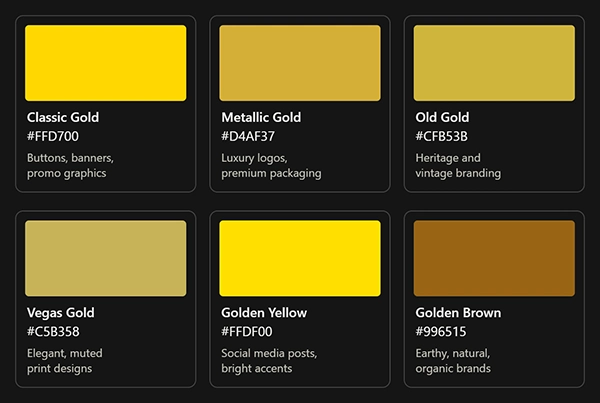
| Shade | Hex Code | Best For |
| Classic Gold | #FFD700 | Buttons, banners, promo graphics |
| Metallic Gold | #D4AF37 | Luxury logos, premium packaging |
| Old Gold | #CFB53B | Heritage and vintage branding |
| Vegas Gold | #C5B358 | Elegant, muted print designs |
| Golden Yellow | #FFDF00 | Social media posts, bright accents |
| Golden Brown | #996515 | Earthy, natural, organic brands |
The bottom line is this: #FFD700 is bold. Therefore, it will work for you if you are trying to create an energetic vibe, but it may come off as inexpensive to consumers who associate themselves with luxury brands. On the other hand, #D4AF37 seems like a much less aggressive color that would be a better fit for jewelry, hotel branding, and financial institutions.
The two colors we’ve identified so far, old gold and Vegas gold (and all their related shades), seem to fall somewhere in the middle. These soft to muted hues have a natural aesthetic appeal on both paper and packaging. And if you’re looking to use a warm earth tone rather than bright, flashy yellow, then golden brown pairs well with cream, olive green, and terracotta.
Color Code for Golden Color: RGB, CMYK, and HSL Values
You have to determine which color code system you’ll be using (HEX and RGB for screens, CMYK for printing, and HSL for flexible web styling). Below are all three color codes for this shade of golden color.
| Shade | HEX | RGB | HSL | CMYK (approx.) |
| Classic Gold | #FFD700 | 255, 215, 0 | 51°, 100%, 50% | 0, 16, 100, 0 |
| Metallic Gold | #D4AF37 | 212, 175, 55 | 46°, 65%, 52% | 0, 17, 74, 17 |
| Old Gold | #CFB53B | 207, 181, 59 | 49°, 61%, 52% | 0, 13, 71, 19 |
| Vegas Gold | #C5B358 | 197, 179, 88 | 50°, 48%, 56% | 0, 9, 55, 23 |
| Golden Yellow | #FFDF00 | 255, 223, 0 | 52°, 100%, 50% | 0, 13, 100, 0 |
| Golden Brown | #996515 | 153, 101, 21 | 36°, 76%, 34% | 0, 34, 86, 40 |
You can create light/dark variations of the exact same gold with HSL by only adjusting the third number in the HSL coding.
Common Mistake That People Make: Using a screen gold directly in a CMYK conversion. A straight mathematical conversion from an RGB/HEX value to CMYK doesn’t reproduce how ink behaves in comparison to a glowing screen. Make sure to always get a hard-copy printed proof or order a Pantone or foil version of your product so that you receive a true metallic finish.
What Does the Color Gold Mean in Branding?
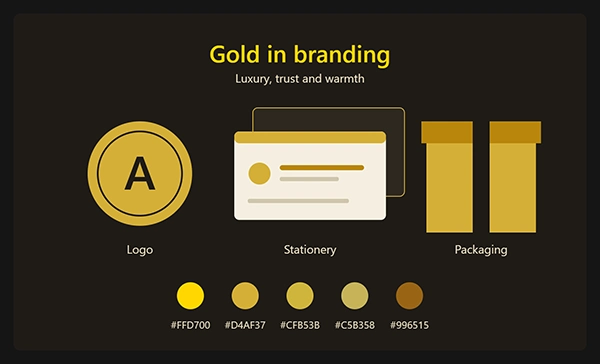
Gold symbolizes luxury, success, quality, and optimism to consumers. Gold also evokes associations with trophies, jewelry, premium products, etc. Therefore, a gold accent on a brand could establish credibility prior to the consumer reading a single word of the content.
The most common areas where you’ll find gold being applied well include:
- Jewelry and Watches
- Finance and Wealth Management
- Hospitality (hotel and CSS-named)
- Beauty and Skincare
- Premium Chocolate and Food
Honestly, I believe that gold is at its best when used as an accent rather than as a base color. A logo oversaturated in bright yellow-gold typically appears cheap. A deep navy or black logo with one gold detail typically presents confidence. Most premium brands use a dark base color with gold used to create contrast (i.e., only one gold detail).
Did You Know?
The #FFD700 is the official CSS named color for ‘gold,’ which has been incorporated into web standards so all modern browsers support it.
Why Does Gold Look Flat on Screens (and How to Fix It)?
Gold will look flat to you if your design is simply showing the gold as one solid color with no texture. The reason metal looks like it shines is that it can show highlights, mid-tones, and shadows all together. One single #D4AF37 can’t.
What you want here is a gradient. Use three different shades of gold, a light one for the highlight (lightest) of your metal, a mid-tone (#D4AF37), and then a darker shadow shade.
- Highlight: #F7E7A1
- Mid-tone: #D4AF37
- Shade/Shadow: #9A7B1C
Apply the gradient to your logo/button/heading at roughly a 135° angle. Add even more visual interest by adding some shine to a very thin, light-colored outline.
Pro Tip: As long as you have this, you’ll always have something flat, using one single color, gold, that can be used for embroidery, etc., since gradients tend to fail when they are reduced in size.
How to Use Gold Hex Codes in Your Designs
Match gold to the job. Apply the calm gold to your logo or branding; apply bright gold to your calls to action. Below are the details on how to use each in every format:
1. In Logos and Brand Identity
Choose one main gold color and document its hex, RGB, and CMYK values within your brand style guide. This will ensure that when used across all formats (e.g., website, business card, billboard), the gold colors will always look exactly the same.
2. On Websites and Apps
Add the code to your CSS like this:
css
.gold-button {
background-color: #FFD700;
color: #1a1a1a;
}
.gold-gradient {
background: linear-gradient(135deg, #F7E7A1, #D4AF37, #9A7B1C);
}
Watch your contrast. Gold text on a white background is very hard to read, at roughly 1.4:1 for #FFD700, while WCAG recommends at least 4.5:1 for normal text. Put dark text on gold backgrounds instead.
3. In Social Media Graphics
Golden Yellow (FFDF00) is most visible on a busy feed, especially when your background is dark. Only use gold to create focus with one element of your post at a time: a headline or border. Do not use it to color all elements.
4. In Print
You can achieve foil stamping (business cards), packaging, or invitations by using a Pantone Metallic Ink. This will give you the shiny effect that CMYK gold does not.
Best Colors to Pair With Gold
Gold has a great combination with deep, rich neutral jewel tones. Some of the most popular pairings that never go wrong are as follows:
- Navy blue: classic, trustworthy, and professional
- Black: bold, modern, and premium
- White or cream: clean and airy
- Emerald green: rich and natural
- Burgundy: warm, traditional luxury
Don’t use gold with other bright warm colors, such as orange; they compete for attention and make the design feel busy.
Common Gold Color Mistakes Brands Make
Most gold problems come from a handful of habits. Watch out for these:
- Using bright yellow-gold for a luxury brand, which makes it feel cheap
- Placing gold text on white, which hurts readability
- Skipping the CMYK conversion before sending files to print
- Mixing too many gold shades in one design
- Having no flat fallback for small or one-color uses
Need Help Picking Your Brand Colors?
Working with a seasoned designer can make choosing the right gold much simpler. The Brand Identity Design Team at Pixifyo creates your entire color palette to ensure that our logo design services will look great on all screens and printing media as well.
You will be working with senior designers and receive a 24-48 hour turnaround time, and we do not require you to pay for anything until you approve the work done by one of our senior designers.
Conclusion
Gold in hex form is #FFD700; however, you want to pick the one that works best for your brand. Use the same primary color throughout, document its HEX, RGB & CMYK, and only use gold to maintain an elite look.
Looking to create a color palette that will be just as great in print as it appears on screen? Begin your free trial of Pixifyo today, or show us your favorite gold hue below.
FAQs
1. What is the gold hex code?
Gold has the hex code #FFD700. Gold is also an official CSS named color called “gold.” For that deep gold look, many will use #D4AF37.
2. What is the difference between gold and metallic gold?
Classic gold (#FFD700) is a flat, bright yellow. Metallic gold (#D4AF37) is more muted than classic gold and will give your design a slightly more realistic metal look. Both colors lack sheen unless you add a gradient or foil finish.
3. What is the best gold color code for a logo?
#D4AF37 is a safe choice for most logos because it feels premium and stays readable. Pair it with navy or black, and keep a flat version for small sizes.
4. What is the CMYK value of gold for printing?
Classic gold converts to roughly 0, 16, 100, 0 in CMYK. Treat this as a starting point and request a printed proof, since ink looks different from a screen.